• Skip to main content
  • Skip to main content
Choose which site to search.
University of Arkansas for Medical Sciences Logo University of Arkansas for Medical Sciences
Communications and Marketing: Web Services
  • UAMS Health
  • Jobs
  • Giving
  • About Us
  • AI Wayfinding
    • Introduction
    • Report an AI Issue
    • Strategic View
  • Knowledge Base
  • UAMS Website Theme
  • Web Accessibility
  1. University of Arkansas for Medical Sciences
  2. Communications and Marketing
  3. Web Services
  4. UAMS Website Management and Branding Guidelines

UAMS Website Management and Branding Guidelines

Last modified: November 18, 2025
You are here:
  • Knowledge Base
  • Style Guide
  • UAMS Website Management and Branding Guidelines

This article outlines the guidelines and workflow for managing websites associated with the University of Arkansas for Medical Sciences (UAMS) to ensure consistency, compliance, branding, and web accessibility. It applies to all web presences representing UAMS, including websites, subdomains, microsites, and third-party platform content (e.g., blogs).

Definitions

  • Official UAMS Websites: Websites hosted and managed by UAMS, using UAMS infrastructure and fully controlled by UAMS personnel.
  • External Affiliated Websites: Websites not hosted by UAMS but representing UAMS programs, partnerships, or initiatives, or using UAMS trademarks (e.g., logo, name).
  • UAMS Branding: Includes the official UAMS logo, color palette (per UAMS Brand Guidelines), and typography.
  • Official UAMS Theme: The full UAMS web template, including branding, navigation structure, and accessibility-compliant design, as provided by the UAMS Web Services.
  • Web Presence: Any online content representing UAMS, including websites, subdomains, microsites, or third-party hosted pages (e.g., blogs).

Official UAMS Websites

All websites managed by UAMS must:

  • Use the official UAMS theme, as provided by UAMS Web Services.
  • Fully conform to Web Content Accessibility Guidelines (WCAG) 2.1 Level AA (required under the U.S. Department of Justice Title II ADA final rule for state and local government entities by April 24, 2026). Compliance is monitored via Blackboard Ally for Websites and periodic manual audits.
  • Be approved by the UAMS web manager before launch, following submission of a website proposal outlining purpose, content, and technical specifications.
  • Undergo annual compliance audits to ensure adherence to theme, branding, and accessibility standards.

Websites that do not adhere to the UAMS theme, branding, or WCAG 2.1 Level AA standards will not be hosted or managed by UAMS and may face suspension of hosting services until compliance is achieved.

External Websites Affiliated with UAMS

External websites associated with UAMS must:

  • Incorporate UAMS branding, including the official UAMS logo, color palette, and typography.
  • Include a footer disclaimer stating, β€œThis site is affiliated with UAMS but independently managed.”
  • Fully conform to WCAG 2.1 Level AA by April 24, 2026, with compliance documentation available upon request and verification possible via Blackboard Ally for Websites or other approved tools.
  • Provide UAMS with administrative access (e.g., CMS and hosting admin login credentials) via a formal agreement (e.g., MOU) to allow updates or changes for compliance. Failure to provide or maintain access may result in termination of affiliation, removal of UAMS branding, or legal action.
  • Be registered with the UAMS web manager before launch, including submission of hosting details and responsible parties.

UAMS is ultimately responsible for accessibility compliance of affiliated websites and reserves the right to audit these sites annually (or more frequently if issues arise). Non-compliance with WCAG 2.1 Level AA after April 24, 2026 may lead to de-affiliation or other remedies as outlined in the affiliation agreement.

Hosting Requirements

  • Websites hosted by UAMS must use the official UAMS theme and meet all accessibility standards.
  • For websites not part of UAMS, customers must secure hosting and design services from providers not affiliated with UAMS. Hiring UAMS personnel for these services may create a conflict of interest.

Support and Inquiries

For assistance with implementing the UAMS theme, branding, or accessibility standards, or for any questions regarding these policies, please contact the UAMS web manager.

Flowchart

The following flowchart provides a simplified visual representation of the eligibility criteria for UAMS websites. Click the image to view the full-size version. For complete and authoritative details, please refer to the text description above.
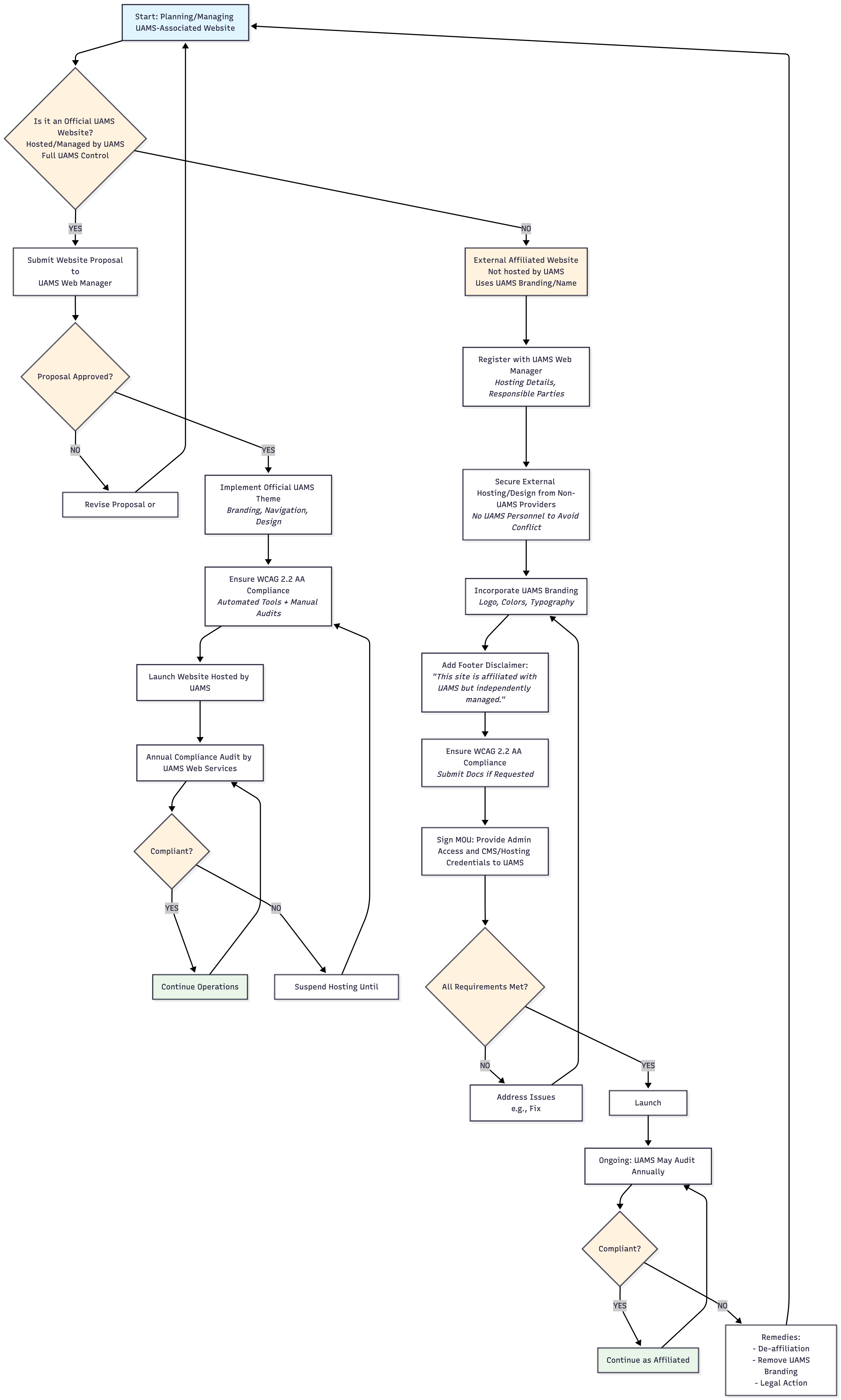
Flowchart diagram titled "UAMS Website Management Workflow" for managing official and external affiliated websites, ensuring branding, WCAG 2.2 AA accessibility, and compliance. 

Central start node: "πŸ†• Plan UAMS Website" (light blue).

Branches at diamond decision: "Hosted by UAMS??" (orange).

**Official Path (Left/Green - Success nodes in green):**
- "βœ… YES Official" β†’ "πŸ“‹ Submit Proposal to Web Mgr" β†’ Diamond "βœ… Approved?"
  - "❌ NO" loops back to revise/resubmit.
  - "βœ… YES" β†’ "🎨 Official Theme + WCAG 2.2 AA" β†’ "πŸš€ Launch on UAMS" β†’ "πŸ“Š Annual Audit" β†’ Diamond "βœ… Compliant?"
    - "βœ… YES" loops to launch.
    - "❌ NO" β†’ "πŸ”§ Fix & Relaunch" (yellow) β†’ back to theme.

**External Affiliated Path (Right/Blue):**
- "❌ NO External" β†’ "πŸ“ Register w/ Web Mgr" β†’ "☁️ External Host (No UAMS Staff)" β†’ "🏷️ UAMS Branding + Disclaimer Footer" β†’ "πŸ”‘ MOU: Give UAMS Admin Access" β†’ Diamond "βœ… All Set?"
  - "❌ NO" β†’ "πŸ”§ Fix Issues" (yellow) β†’ back to branding.
  - "βœ… YES" β†’ "πŸš€ Launch" β†’ "πŸ“Š Annual Audit" β†’ Diamond "βœ… Compliant?"
    - "βœ… YES" loops to launch.
    - "❌ NO" β†’ "⚠️ De-Affiliate / Remove Branding" (red) β†’ back to start.

Arrows show loops for audits/fixes. Decisions in orange, successes green, warnings yellow. Emojis enhance steps. Applies to all UAMS web presences.

UAMS Website Decision Tree

The following decision tree determines the eligibility criteria for UAMS websites.

Type of Website
The next step is to submit your website proposal to the UAMS Web Manager for approval.

External affiliated website are not hosted by UAMS but use the UAMS branding/name.

The next step is to submit your website proposal to the UAMS Web Manager for approval.

If your proposal is approved, you will need to:

  • Register your site with the UAMS Web Manager. This includes providing hosting details, responsible parties, etc.
  • Secure external hosting and design from Non-UAMS Providers. This means no UAMS personnel to avoid any conflict of interest.
  • Incorporate UAMS Branding. This includes logos, colors, typography, etc.
  • Add Footer Disclaimer: “This site is affiliated with UAMS and UAMS Health but is independently managed.”
  • Ensure WCAG 2.2 AA Compliance and submit the necessary proof of compliance if requested.
  • Sign MOU and provide UAMS Web Manager with the CMS/Hosting credentials.
Proposal Approved?
Congratulations on your proposal being approved. The next steps are:
  • The UAMS Web Team will implement the official UAMS theme which assures consistent brandingm navigation and design.
  • You will need to self assign β€œWeb Accessibility Training for UAMS WordPress and Calendar Editors” in Workday. If another UAMS employee will be updating the site, they must self assign the training. Only UAMS employees can make updates to official UAMS websites.
  • Gather and organize the information you want to place on your website.
  • Ensure WCAG 2.2 AA Compliance using automated tools and manual audits.
  • Launch your new website.
  • Annual compliance audit by UAMS Web Services.
Compliant?
Your website will be suspended until you make the necessary changes to become compliant.
Congratulations on maintaining a compliant website. Keep up the good work!
Your next step is to revise your proposal to meet the UAMS Website Management and Branding Guidelines.
Was this article helpful?
Like 0 Dislike 0
University of Arkansas for Medical Sciences LogoUniversity of Arkansas for Medical SciencesUniversity of Arkansas for Medical Sciences
Mailing Address: 4301 West Markham Street, Little Rock, AR 72205
Phone: (501) 686-7000
  • Facebook
  • X
  • Instagram
  • YouTube
  • LinkedIn
  • Pinterest
  • Disclaimer
  • Terms of Use
  • Privacy Statement
  • Legal Notices

© 2026 University of Arkansas for Medical Sciences