Creating a New Resident Provider Profile
Follow the steps for Creating a New Provider Profile, with these modifications.
On the Clinical Profile tab, set Is the provider a resident? toggle to Yes.

Once this has been toggled on, several fields will no longer be available on the Clinical Profile and Education tabs. The Academic Profile tab will be removed altogether. But the Resident Profile tab will be added.
Resident Profile Tab
In the Resident Profile tab, fill in the required fields.
Personal Details Section
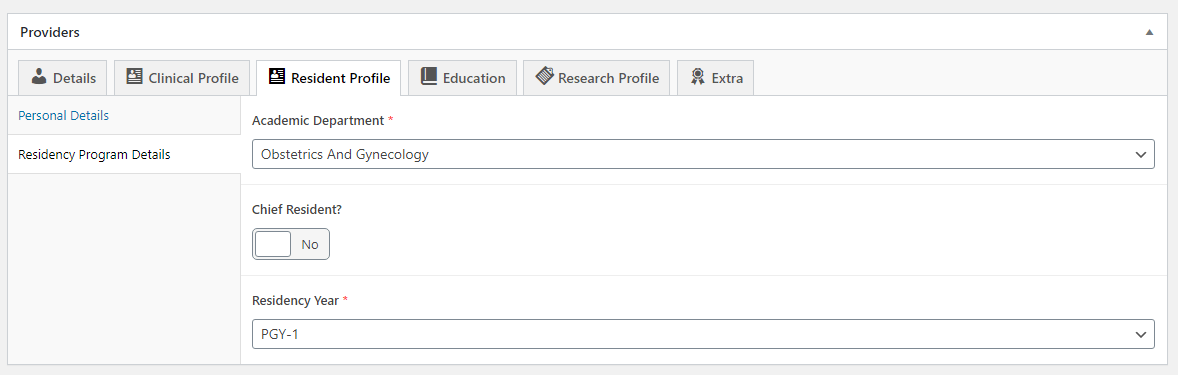
Add the information about the resident’s hometown city and state or country. This will be used on resident lists that are included on academic department websites and will not display on their provider profile.
The Medical School field in the Personal Details section of the Resident Profile tab will be used to display that information once these profiles are incorporated into academic department websites. You will still need to add medical school on the Education tab for it to display on their provider profile.
Residency Program Details Section
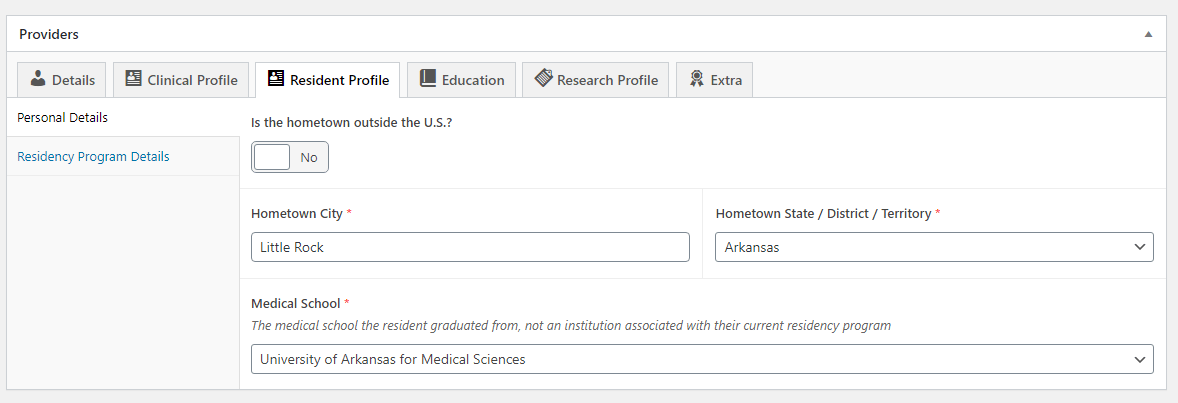
Select the academic department that is relevant to their residency. If you do not see the appropriate residency year, reach out to the web team for assistance (See Adding Additional Residency Year Options).
If they are a chief resident, toggle the Chief Resident? input to Yes. Doing so will remove the Residency Year field.
If they are not a chief resident, select the relevant residency year. If you do not see the appropriate residency year, reach out to the web team for assistance.