
WordPress Table Block
The content in this article is related to a style update that is pending as of Aug. 24, 2020.
Data tables are used to organize data with a logical relationship in grids. Accessible tables need a header section as well as a body. Assistive technologies use this information to provide context to users.
There are two table types that we support: the WordPress Table block and the TablePress plugin. This article will be covering the WordPress Table block.
To add a table, add the block called Table. As a shortcut, you can type “/table” in an empty block and the “Add block” menu will appear, filtered to have the Table block visible.
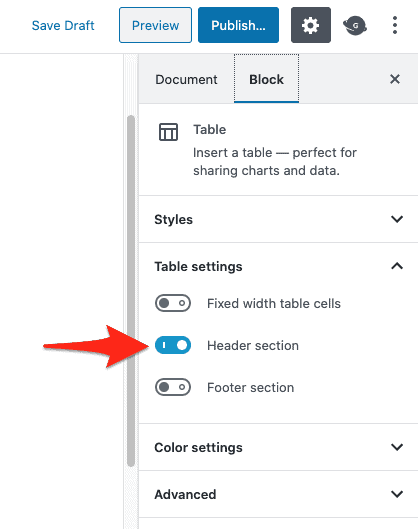
To add the header section, select the table block and toggle Header section on in the Block panel on the right side of your window.
By default the WordPress Table block will display with a border around the cells and a thick border separating the head from the body. We encourage you to use this default style with your table. However, if there is a need for a different style, you can add certain class values to the Table block to achieve a different style.
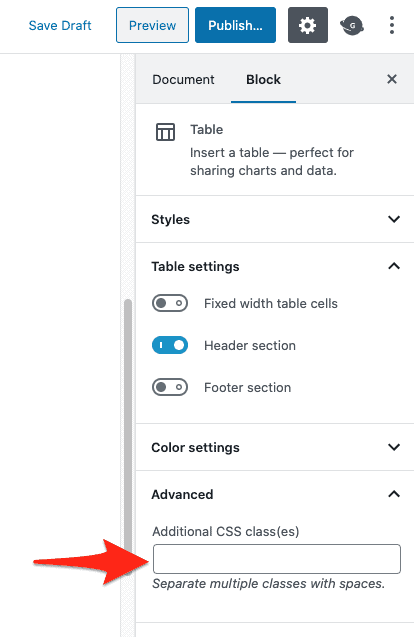
To add a class value to your Table block, select the block and add a specific value to the Additional CSS class(es) under the Advanced tab of the Block panel on the right side of your window. The different table styles and the relevant classes are detailed below.
Default
No action required.
| Keys | Values |
|---|---|
| Key 1 | Value 1 |
| Key 2 | Value 2 |
Borderless
Add class table-borderless.
| Keys | Values |
|---|---|
| Key 1 | Value 1 |
| Key 2 | Value 2 |
Striped
Add class table-striped.
| Keys | Values |
|---|---|
| Key 1 | Value 1 |
| Key 2 | Value 2 |
Hover
Add class table-hover.
| Keys | Values |
|---|---|
| Key 1 | Value 1 |
| Key 2 | Value 2 |
Dark
Add class table-dark.
| Keys | Values |
|---|---|
| Key 1 | Value 1 |
| Key 2 | Value 2 |
Dark Borderless
Add class table-dark table-borderless.
| Keys | Values |
|---|---|
| Key 1 | Value 1 |
| Key 2 | Value 2 |
Dark Striped
Add class table-dark table-striped.
| Keys | Values |
|---|---|
| Key 1 | Value 1 |
| Key 2 | Value 2 |
Dark Hover
Add class table-dark table-hover.
| Keys | Values |
|---|---|
| Key 1 | Value 1 |
| Key 2 | Value 2 |