
Proper Heading Structure for Web Accessibility
Headings (<h1> through <h6>) are essential semantic HTML elements that organize content and create a logical structure on web pages. They do much more than make text appear larger or bolder. Headings provide a navigable outline of the page, especially for users of screen readers and other assistive technologies.
Why Proper Heading Structure Matters
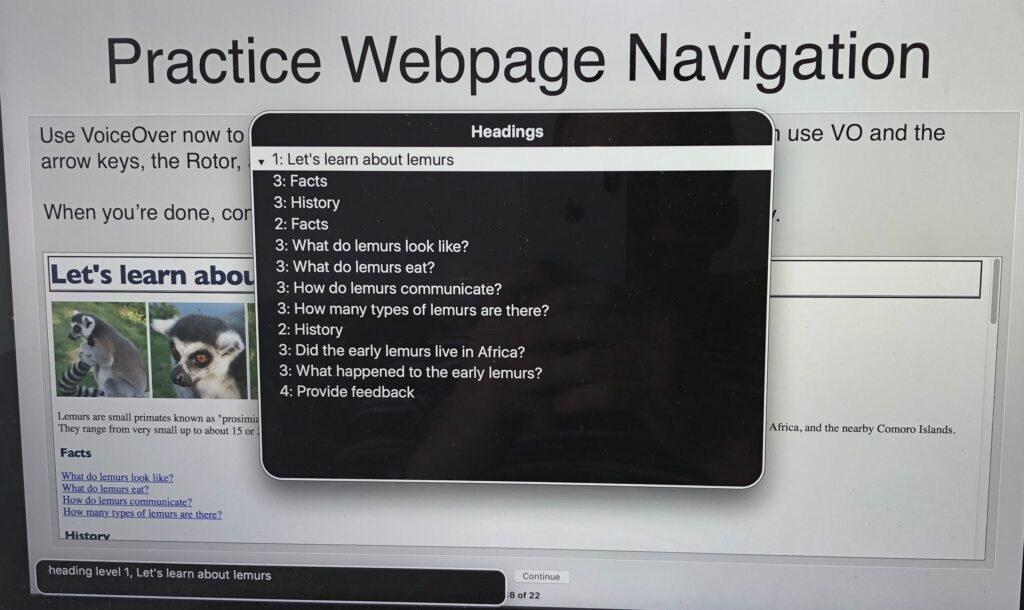
Headings act like a table of contents for your webpage. Sighted users can visually scan headings to understand the page layout and quickly find relevant sections. For screen reader users, headings enable efficient navigation: they can jump directly from one heading to the next with a single keystroke (e.g., the “H” key in many screen readers), skipping over less relevant content.
Without a logical heading structure:
- Screen reader users may need to listen to the entire page linearly, which is time-consuming and frustrating.
- The page’s organization becomes unclear, reducing usability for everyone.
- It can impact SEO, as search engines use headings to understand content hierarchy.
This supports WCAG Success Criteria such as:
- 1.3.1 Info and Relationships (semantic structure must be conveyed programmatically).
- 2.4.6 Headings and Labels (headings should clearly describe section topics).
Headings Are Semantic, Not Just Stylistic
Do not choose heading levels based solely on how big or bold you want the text to look. Using CSS to style regular paragraphs (<p>) as large text might achieve the visual effect, but it provides no semantic meaning to assistive technologies.
- Incorrect approach: Styling text with CSS classes like .big-text or skipping heading levels for visual appeal.
- Correct approach: Use proper <h1>–<h6> tags for structure.
Semantic headings ensure the structure is conveyed to all users, regardless of how the page is rendered.
Best Practices for Heading Structure
- One <h1> per page: The <h1> should represent the main topic or page title (e.g., the primary page heading). Use only one per page for clarity.
- Logical, hierarchical order: Nest headings properly: Start with <h1>, then <h2> for major sections, <h3> for subsections, and so on.
- Increase levels by one at a time (e.g., <h2> followed by <h3>, not <h4>).
- You can “go back” levels (e.g., <h3> followed by <h2>), but avoid skipping to prevent confusion.
- Descriptive and concise: Headings should clearly describe the section content.
- Avoid using headings for non-heading content: Don’t use them just for emphasis or styling (e.g., no <h4> for footnotes).
Resources for Further Reading
- W3C Web Accessibility Initiative (WAI): Headings Tutorial — Comprehensive guide on nesting and best practices.
- MDN Web Docs: HTML Heading Elements — Technical details on <h1>–<h6>.
- Deque University: Heading Order Rule — Explains logical order and common errors.
- The A11Y Project: Accessible Heading Structure — Practical tips and examples.
- WebAIM: Semantic Structure (including Headings) — Why semantics matter beyond visuals.
Implement these practices in your UAMS site edits to improve accessibility for patients, learners, and staff. Test with tools like WAVE or axe DevTools, or try navigating your page with a screen reader (e.g., NVDA or VoiceOver) using only headings!