
Marketing Landing Page Header Option
The Marketing Landing Page header is one of the page header options in the UAMS 2020 theme. See Header Options for all of the options.
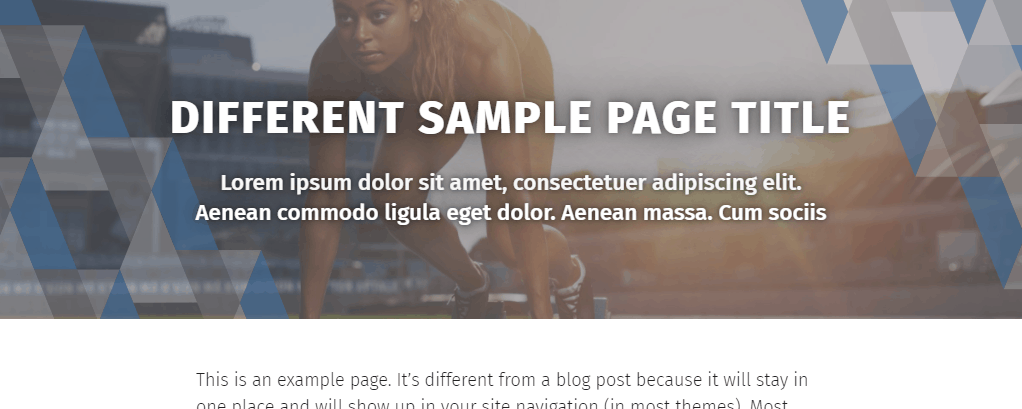
This option is reserved for landing pages landing pages built for specific marketing campaigns that include things like paid search, magazine advertisements, Facebook ads, billboards, etc. Do not apply this to your page unless you are creating a marketing landing page. Before applying this option, reach out to the web team if you think this option is right for your page.
This header option creates a full-width container that places a background image behind the UAMS triangle pattern in blue, white and gray.

Text Elements
You must set a new text value for the title. This is so that there can be a character limit on this title. It also allows you to display a different title than the one that would show up on the browser window or on Google. You can reuse your page title if you want, as long as it is at or under the character limit.
You may also add a brief lead paragraph that either helps describe what this landing page is about or provides a kind of subtitle.
Text details:
- Marketing Landing Page Title Heading
- Character limit: 62 characters
- The heading text must be more than one word.
- The heading text must be capitalized using the AP Style rules for composition titles.
- Marketing Landing Page Title Lead Paragraph
- Character limit: 117 characters
- The lead paragraph text must be written in full sentences and must use proper punctuation.
Image(s)
The image must be a photo, preferably one containing people. This can be a UAMS photo or a stock image relevant to the purpose and context of the particular page. Logos must not be used.
You can upload a single image to the Desktop image input and let the system automatically crop the image for the mobile breakpoint. Or you can upload one version for Desktop and another for Mobile.
We recommend you crop your image to the appropriate aspect ratio(s) before uploading it to your site. If you do not crop the image, the system will automatically crop it down to those aspect ratios, which may result in an undesirable composition.
The appearance of the image will be automatically adjusted to provide sufficient contrast between the image and the text so that we can meet accessibility guidelines.
The UAMS triangle pattern will automatically be placed over the image.
Image details:
- Image, Desktop
- The desktop image is required.
- The desktop image will be displayed when the browser viewport size is at a width associated with desktop and laptop computers.
- Minimum image dimensions: 1435×768
- Recommended image dimensions: 5120×1600
- The desktop image will automatically be cropped to a 16:5 aspect ratio.
- Image, Mobile
- The mobile image is optional. If an image is not defined, the desktop image will be cropped and resized to the necessary dimensions.
- Define the mobile image if automatically cropping and resizing the desktop image would yield undesirable results.
- The mobile image will be displayed when the browser viewport size is at a width associated with tablets and other mobile devices.
- Minimum image dimensions: 992×806
- Recommended image dimensions: 1984×1612
- The mobile image will automatically be cropped to a 16:13 aspect ratio.