
Embedding a Video on a Page
Quality and Accessibility
First, make sure any video meets the Requirements for Videos if it is hosted on a UAMS video platform account and/or embedded on a UAMS web property.
Text Content to Accompany the Video Player
The video player must not be simply placed on a page with no visible text to give it context in relation to the page.
Write a heading and a brief introductory paragraph to accompany the video on the page.
The text content should meet the following requirements.
- The text describes the content and purpose of the video.
- The text explains how the video relates to the content and purpose of the page.
- The text encourages the users to watch the video.
Adding the Video to the Page
When you have built a landing page that is full of UAMS Blocks, and you need to add an embedded video player to the page, use a UAMS Section Block. If the UAMS Section Block is not available in the particular placement, use a UAMS Content Block.
Otherwise, paste the video URL on your page after adding the introductory paragraph about the video.
UAMS Section Block
Add a UAMS Section Block.
Give it a title, but do not hide the title. Leaving the title visible gives the user a jumping-in point.
Add the introductory paragraph text to a paragraph block at the beginning of the UAMS Section Block’s content area.
Paste the video URL after the paragraph block.
Set the alignment of the video block as Wide.
UAMS Content Block
If the UAMS Section Block is not available in the particular placement, add a UAMS Content Block.
Give it a title, but do not hide the title. Leaving the title visible gives the user a jumping-in point.
Add the introductory paragraph text to a paragraph block at the beginning of the UAMS Content Block’s content area.
YouTube
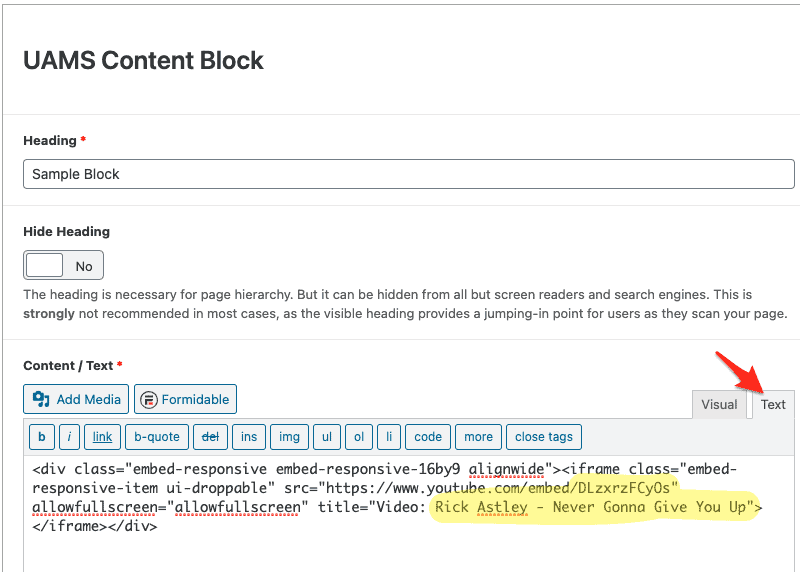
Add the following HTML to the Content field of that UAMS Content Block after the paragraph:
<div class="embed-responsive embed-responsive-16by9 alignwide">
<iframe class="embed-responsive-item ui-droppable" src="https://www.youtube.com/embed/REPLACE-THIS-VALUE" allowfullscreen="" title="Video: ADD-A-TITLE"></iframe>
</div>
Replace REPLACE-THIS-VALUE with the relevant YouTube ID from your video URL.
Replace ADD-A-TITLE with a relevant video title. You can just copy the name of the video from YouTube.
You could also replace the iframe element with the relevant element from another video service’s embed code. Just make sure to add the title attribute for accessibility.
Vimeo
Add the following HTML to the Content field of that UAMS Content Block after the paragraph:
<div class="embed-responsive embed-responsive-16by9 alignwide">
<iframe class="embed-responsive-item ui-droppable" src="https://player.vimeo.com/video/REPLACE-THIS-VALUE" allowfullscreen="" title="Video: ADD-A-TITLE"></iframe>
</div>
Replace REPLACE-THIS-VALUE with the relevant Vimeo ID from your video URL.
Replace ADD-A-TITLE with a relevant video title. You can just copy the name of the video from Vimeo.
You could also replace the iframe element with the relevant element from another video service’s embed code. Just make sure to add the title attribute for accessibility.
Sample Block With YouTube Video
Lorem ipsum dolor sit amet, consectetuer adipiscing elit. Aenean commodo ligula eget dolor. Aenean massa. Cum sociis natoque penatibus et magnis dis parturient montes, nascetur.

Sample Block With Vimeo Video
Lorem ipsum dolor sit amet, consectetuer adipiscing elit. Aenean commodo ligula eget dolor. Aenean massa. Cum sociis natoque penatibus et magnis dis parturient montes, nascetur.