
Descriptive Link Text for Web Accessibility
Hyperlink text (the visible, clickable words) should clearly describe the link’s purpose or destination. This is a key accessibility practice that helps all users, especially those using screen readers or navigating via keyboard.
Why Descriptive Link Text Matters
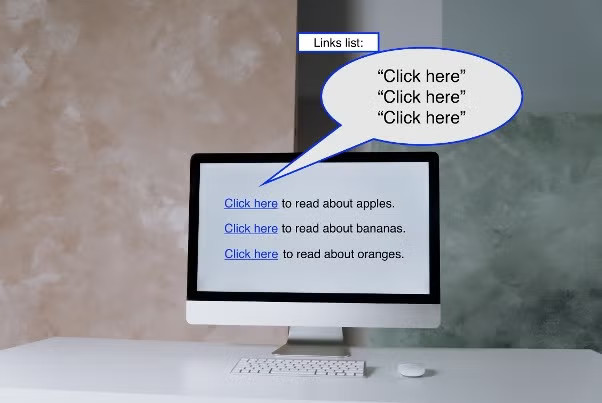
Screen reader users often navigate by pulling up a list of all links on a page, hearing them read out of context. Generic phrases like “click here,” “read more,” or “learn more” provide no information when isolated. Imagine hearing “click here, click here, click here” repeatedly.
Descriptive link text:
- Makes navigation faster and less frustrating for screen reader users.
- Improves usability for everyone (e.g., better context in search results or when skimming).
- Supports SEO and clarity.
This aligns with WCAG Success Criteria:
- 2.4.4 Link Purpose (In Context): The purpose of each link can be determined from the link text alone or with surrounding context.
- 2.4.9 Link Purpose (Link Only) (AAA): Link purpose is clear from text alone.
Best Practices for Descriptive Links
- Make it meaningful standalone Use text that describes the destination or action, e.g., “View UAMS Patient Portal Guidelines” instead of “Click here for guidelines.”
- Be concise but specific Aim for 3–7 words that include key information.
- Avoid URL as link text (unless in a reference list) URLs are hard to read aloud and provide poor context.
- Use surrounding context when needed If multiple links go to the same place, combine text + context is okay for AA compliance.
- Don’t rely on “link” in the text Screen readers already announce links.
Good vs. Bad Examples
Bad: For more information, click here.
Good: Learn more about the UAMS Patient Portal.
Bad: Read more
Good: Explore Telehealth Appointment Options
Resources for Further Reading
- WebAIM: Link Text and Appearance — Detailed guidance with examples.
- W3C WAI: Link Purpose — Official WCAG explanation.
- The A11Y Project: Descriptive Links — Practical tips.
- Deque University: Link Name Rule — Common errors and fixes.
Test your links with tools like WAVE or by using a screen reader’s links list (e.g., NVDA + Insert + F7).